Pelli, home
  • Pricing
  • Examples
  • About
Log inTry for free
Log inTry it

Galleries and delivery

  • Client galleriesProofing, delivery, HD
  • Face sortingEvery guest finds their photos
  • Live galleryFTP upload straight from the camera
  • Lightroom pluginBetaPublish from Lightroom Classic
  • Series & QR codesHundreds of galleries at once
  • Express TransferLarge files, in your branding

Admin and invoicing

  • Quotes, contracts & invoicesSigned and paid online
  • Online bookingClients book on their own
  • Calendar syncGoogle, iCloud, Outlook
  • CRMOne profile per client
  • StatisticsViews, likes, downloads

Sales and visibility

  • Shop & printsSell right from the gallery
  • Gift cardsSessions to give as gifts
  • WebsiteConnected to your galleries
  • Email & SMS campaignsBring clients back
  • Google reviewsHappy clients recommend you
Create an $800 quote for Marie — portrait sessionQuote · QT-2026-0007ClientMariePortrait session$800.00Ready to sendIris, AI assistantBy your side for every task: she answers your clients, drafts your quotes and gives you advice.Meet Iris
NewRetouching requests, right on the photoDiscoverPhoto shop or film lab?Discover PelliLabsAll features

Free tools

Pelli InstantAI photo culling for Mac and Windows

Calculators

  • Sun Calculator
  • Spot Finder
  • Price Calculator
  • DOF Calculator

Templates

  • Quote template
  • Invoice template
  • Contract template
All free tools

Discover

  • BlogTips for photographers
  • ComparisonsPelli vs the alternatives

Support

  • Help centerStep-by-step guides and FAQ (opens in a new tab)
  • Discord communityTalk with other photographers (opens in a new tab)
  • Service statusLive service availability (opens in a new tab)
  • Contact usQuestions? Write to us
RoadmapWhat's new and what's coming to PelliSee the roadmap (opens in a new tab)

Site language

  • FrançaisFR
  • English
  • DeutschDE
  • EspañolES
  • ItalianoIT
  • NederlandsNL
  • PolskiPL
  • PortuguêsPT
  • SvenskaSV
  • Pricing
  • Examples
  • About
Iris, AI assistantBy your side for every task: she answers your clients, drafts your quotes and gives you advice.Meet Iris

Galleries and delivery

  • Client galleriesProofing, delivery, HD
  • Face sortingEvery guest finds their photos
  • Live galleryFTP upload straight from the camera
  • Lightroom pluginBetaPublish from Lightroom Classic
  • Series & QR codesHundreds of galleries at once
  • Express TransferLarge files, in your branding

Admin and invoicing

  • Quotes, contracts & invoicesSigned and paid online
  • Online bookingClients book on their own
  • Calendar syncGoogle, iCloud, Outlook
  • CRMOne profile per client
  • StatisticsViews, likes, downloads

Sales and visibility

  • Shop & printsSell right from the gallery
  • Gift cardsSessions to give as gifts
  • WebsiteConnected to your galleries
  • Email & SMS campaignsBring clients back
  • Google reviewsHappy clients recommend you
NewRetouching requests, right on the photoPhoto shop or film lab?Discover PelliLabsAll features

Free tools

Pelli InstantAI photo culling for Mac and Windows

Calculators

  • Sun Calculator
  • Spot Finder
  • Price Calculator
  • DOF Calculator

Templates

  • Quote template
  • Invoice template
  • Contract template
All free tools

Discover

  • BlogTips for photographers
  • ComparisonsPelli vs the alternatives

Support

  • Help centerStep-by-step guides and FAQ (opens in a new tab)
  • Discord communityTalk with other photographers (opens in a new tab)
  • Service statusLive service availability (opens in a new tab)
  • Contact usQuestions? Write to us
RoadmapWhat's new and what's coming to Pelli (opens in a new tab)
Try free for 15 days
Log in

Site map

Free guide

Client galleries that make a difference

Free guide included

Our tips, plus a free guide.

Get our guide to making the most of your client galleries, then 2 emails a month: Pelli news and stories from our users.

No spam. Unsubscribe in one click.

Tips and news

All articles →
  • ArticleMaternity photography software: prepare sessions and track image choices
  • ArticlePhoto appointment confirmation: personalize your instructions before the session
  • ArticlePhotography website redesign: prepare the move to your new tool
Pelli, home

Your entire photography business, all in one place.

  • Hosted in France
  • GDPR compliant
  • E-invoicing
Service status(opens in a new tab)Discord community(opens in a new tab)

Product

  • Client galleries
  • Lightroom plugin
  • Series & QR codes
  • Quotes & invoices
  • Booking
  • Iris, AI assistant
  • ChatGPT & Claude
  • Website
  • Marketing
  • Express Transfer
  • Gift cards
  • Pricing

Who it's for

  • Wedding photographers
  • Family photographers
  • Portrait photographers
  • Event photographers
  • Maternity and newborn
  • Boudoir photographers
  • Corporate photographers
  • Studios and agencies
  • Photo shops and film labs

Resources

  • Help center(opens in a new tab)
  • Blog
  • Free tools
  • Pelli Instant
  • Examples
  • Roadmap(opens in a new tab)

Compare

  • Pelli vs Pixieset
  • Pelli vs Fotostudio
  • Pelli vs Pic-Time
  • Pelli vs WeTransfer
  • All comparisons

Company

  • The team
  • A French solution
  • Migration offer
  • Referral program
  • Contact us

© 2026 Pelli · Brest, France

  • Legal notice
  • Terms of sale
  • Terms of service
  • Privacy
Free toolsPelli Instant
Free · Open source

AI photo culling, on your computer.

Drop a shoot: blurry and shaken photos, closed eyes and duplicates are set aside, the best of each burst is kept. You review, then export to Lightroom.

Download for MacDownload for Windows
  • Free with a Pelli account
  • Open source (MIT licence)
  • macOS (Apple Silicon) and Windows

Sorted on your computer
Pelli Instant

Wedding – June 2026

41 photos

Export
Analysing photosSorted!0 of 41
Selected32To review2Rejected7
95
94
Blurry
27
96
94
Closed eyes
81
91
Motion blur
34
94
97
Underexposed
40
88
Motion blur
64
93
Blurry
23
97
96
95
94
94
94
94
93
93
91
91
90
88
87
76
Blurry
23
Overexposed
43
Motion blur
34
Blurry
30
Underexposed
40
Motion blur
48
Blurry
27
0Selected
0To review
0Rejected
32 photos selected
3Blurry2Motion blur1Underexposed1Overexposed

Pelli Instant in brief

  • On your computer: sorting never sends your photos

  • Open source, under the MIT licence

  • RAW and JPEG from most cameras

  • Nothing deleted: your originals stay untouched

From memory card to selection, in four steps.

Pelli Instant does the first pass. You keep the last word.

  1. 1

    Drop a shoot

    Drag a folder onto the window, with or without its sub-folders. A RAW and its JPEG twin count as one photo.
  2. 2

    Let it sort

    It reads the preview embedded in each RAW, measures focus, motion blur and exposure, finds closed eyes and groups bursts. The grid fills in as it goes.
  3. 3

    Review

    Selected, To review, Rejected: each rejection says why. Change any call in one key; your choices always win over the AI's.
  4. 4

    Export

    Star ratings and colour labels for Lightroom, a copy of the selection, or the rejects moved to a sub-folder.

Every rejection gives its reason.

Blurry, Motion blur, Eyes closed, Duplicate: filter by reason, fix what you disagree with in one key, move on.

Drop

Drop a folder, the sorting starts
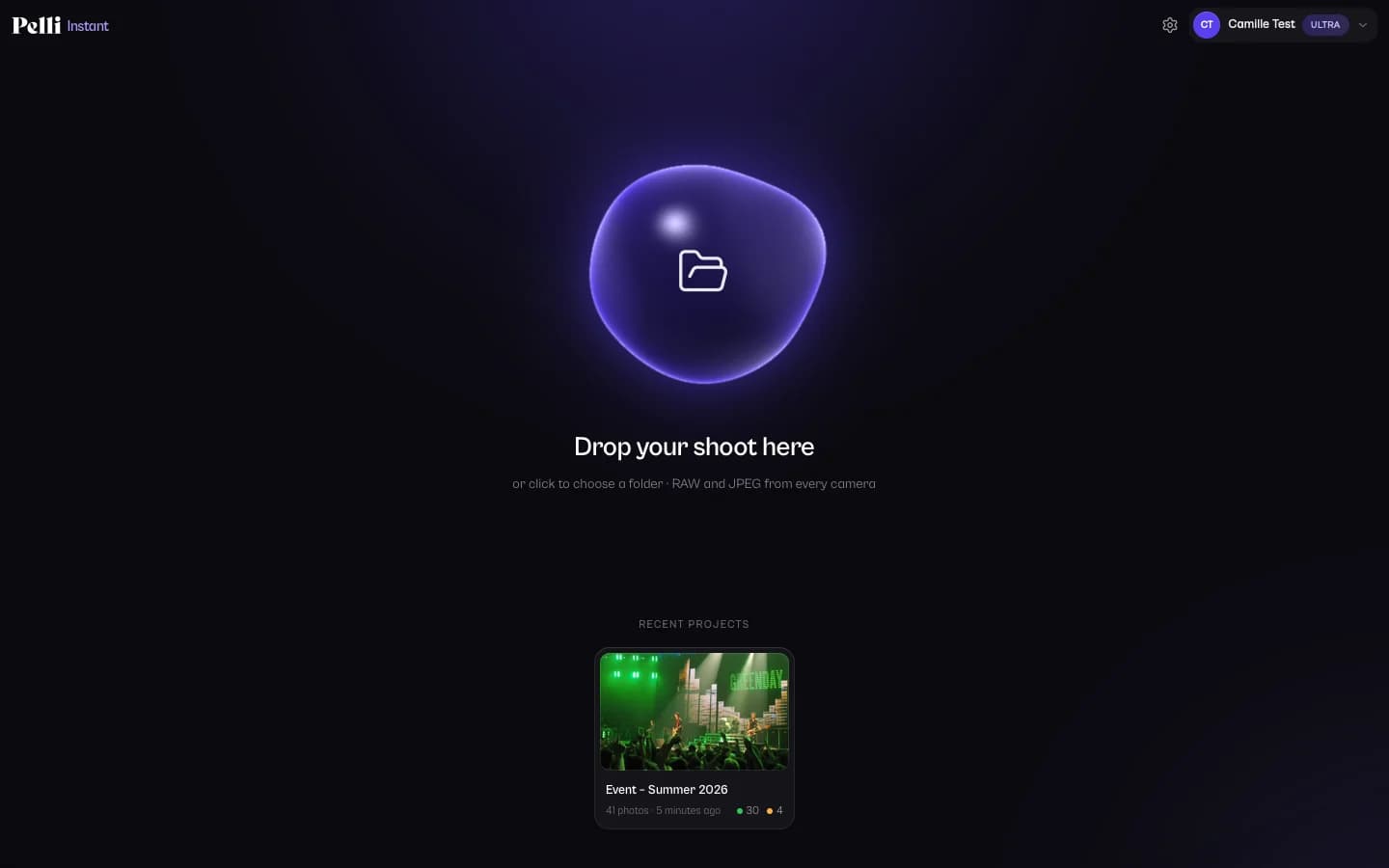
Canon, Nikon, Sony, Fujifilm, OM System, Panasonic, Pentax, DNG or JPEG: Pelli Instant reads the files where they are. Your projects stay on the home screen, and opening a folder again only analyses the new or changed photos.
Pelli Instant
Pelli Instant home screen: drop a shoot folder to sort it, with the recent projects below

Review

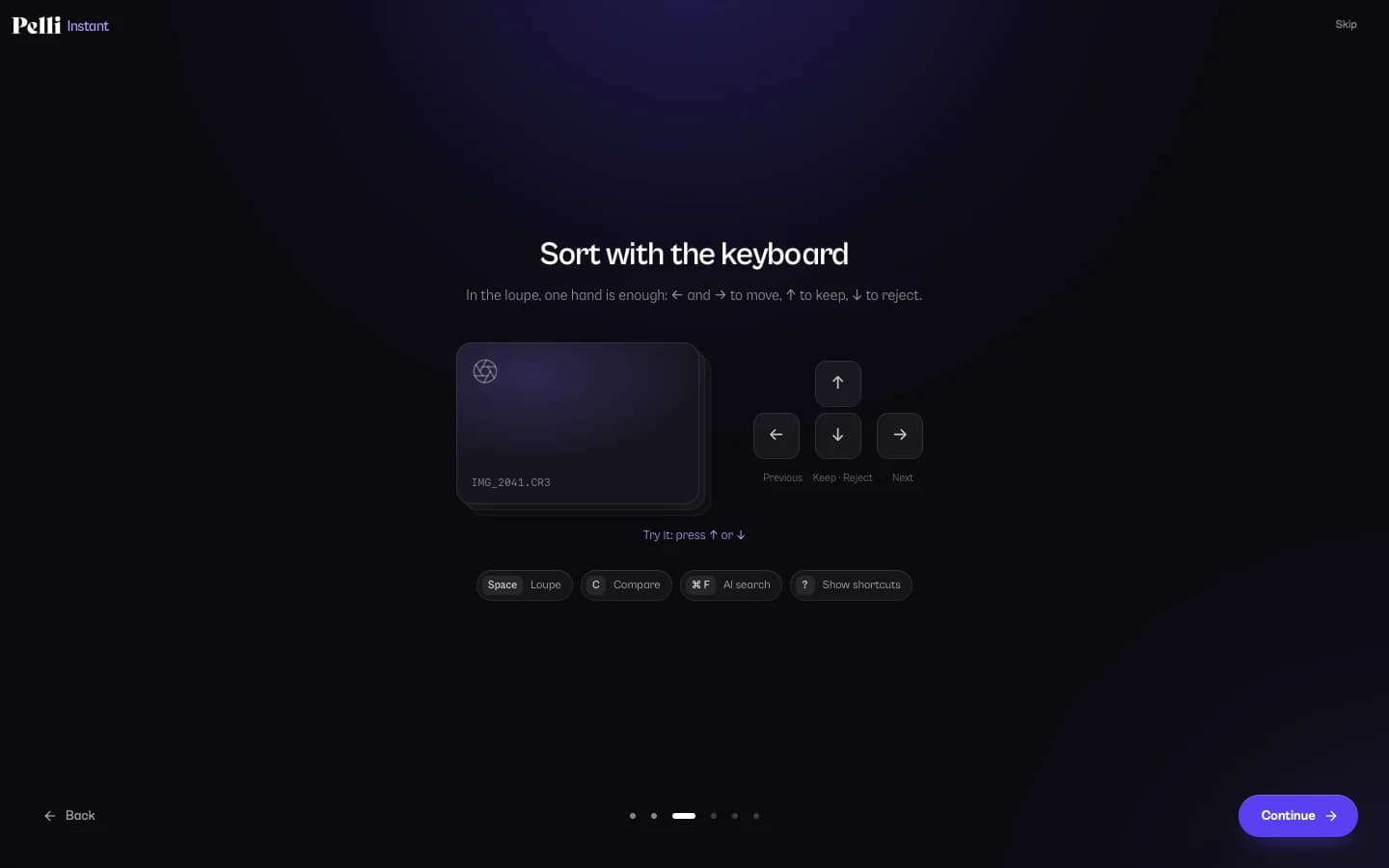
Review at the keyboard

Grid, loupe with 100% zoom and side-by-side compare of a burst. In the loupe, one hand is enough. The Lightroom keys work everywhere.
  • ↑Keep
  • ↓Reject
  • PXULightroom flags
  • 1–5Stars
Pelli Instant
Pelli Instant welcome tour: sorting with the keyboard, ↑ to keep and ↓ to reject

Photos in the animation and screenshots: Flickr photographers, under CC BY 2.0 and CC0 licences. See the credits (opens in a new tab).

A first pass that looks like a photographer.

It tells a deliberate choice from a mistake: creamy bokeh, low-key light or a kiss with closed eyes aren't rejected for nothing.

  • Focus you can trust

    It measures how wide edges are, not how contrasted: shallow depth of field, high ISO and soft light aren't taken for blur. When there's a face, its focus comes first.

  • Closed eyes

    It reads the eyes of every face and tells a blink from a smile. On Balanced or Lenient, closed eyes send a photo to review, never straight to the rejects.

  • Exposure in stops

    It estimates how many stops a photo is off. Low-key and high-key on purpose stay fine; 2 stops off usually goes to review, since a RAW can recover it.

  • Bursts and duplicates

    Similar shots taken seconds apart are grouped, and the best one, or the best few, is kept. Exact copies are found whatever their date.

  • Ratings for Lightroom

    Stars and colour labels in an .xmp file next to each RAW, for Lightroom, Capture One, Bridge or darktable. Ratings set in another app stay, unless you change them here.

  • Copy or file away

    Copy the selection (RAW, JPEG or both) where you want, or move the rejects to a sub-folder next to the originals. Nothing is deleted.

  • Maximum precision

    Standard comes with the app and is fast. The optional Maximum pack (about 777 MB) makes finer calls on group photos, bursts and subjects without a face.

  • AI search

    Type “bride bouquet” or “first dance” and the matching photos come first.

Privacy

Your photos stay on your computer.

The AI models run locally. Pelli Instant reads your photos where they are and never uploads them: not to sort them, not to train anything.

  • Sorted on your computer

    The analysis runs without the internet. Your folders stay untouched until you export, and your photo files are never modified or deleted.

  • Open source

    The whole app is on GitHub under the MIT licence: read it, check it, build it yourself. Each download comes with its SHA-256 fingerprint.

  • No telemetry

    No analytics, no crash reporter. For the account and the quota, Pelli receives photo counts, never your photos, their names or their content.

Read the source on GitHub (opens in a new tab)

Free, with a Pelli account.

The official builds ask you to sign in with a Pelli account, free to create. How many photos you sort each month depends on your Pelli plan.

Photos sorted per month with Pelli Instant, by Pelli plan
Pelli planPhotos / month
FreeNo subscription200
LiteFrom €5/month1,000
ProFrom €15/monthUnlimited
UltraFrom €35/monthUnlimited
Free trial15 days, no credit cardUnlimited
  • A RAW and its JPEG twin count as one photo.
  • Sorting again doesn't count: only photos the app has never seen.
  • The count starts again on the first day of each month.

Create my free accountSee Pelli pricing→

Download Pelli Instant.

Always the latest version, straight from GitHub. On first launch, sign in with your Pelli account.

Mac

  • macOS 12 Monterey or later
  • Apple Silicon: M1 or newer
Download for Mac (.dmg)

If macOS refuses access to a folder, allow Pelli Instant in System Settings → Privacy & Security → Files and Folders.

Windows

  • Windows 10 or 11
  • 64-bit (x64)
Download for Windows (.exe)

The installer isn't code-signed yet: if SmartScreen warns you, click More info, then Run anyway. No administrator rights needed.

  • Standard models included: it works as soon as it's installed.

  • Maximum precision: optional pack of about 777 MB, from the app.

  • Automatic updates, signature-checked before they install.

No Intel Mac or Linux build yet. The code is open: build it yourself (opens in a new tab). Every version: releases on GitHub (opens in a new tab).

Frequently asked questions

Is Pelli Instant free?

Yes. The app is free and open source under the MIT licence. The official builds need a Pelli account, free to create: they sort 200 photos a month on the Free plan, 1,000 on Lite, and as many as you like on Pro, Ultra or during the free trial. If you build it yourself, you can turn the account off.

Why do the official builds need a Pelli account?

That's how Pelli funds the work on Pelli Instant: the monthly quota is tied to Pelli's plans. The account only serves to sign you in and count photos. The code stays open, and anyone can build it without the account.

Is it an alternative to Aftershoot, Narrative Select or FilterPixel?

Yes, for culling: like them, Pelli Instant sorts a shoot with AI and hands your selection over to Lightroom. What sets it apart: its code is open source (MIT), sorting runs on your computer and never sends your photos, there's no telemetry, and it's free with a Pelli account. It doesn't edit your photos: it sorts them.

Standard or Maximum precision?

Standard comes with the app, is fast and suits most shoots. Maximum adds bigger models, about 777 MB to download once, for finer calls on group photos, bursts and subjects without a visible face. The analysis is slower and needs more memory. Choose it in Settings → Analysis; until it's ready, analyses run in Standard.

Does it work offline?

The analysis runs entirely on your computer, without the internet. Signing in needs a connection. On Pro, Ultra or a free trial, you can sort offline; on Free and Lite, Pelli Instant needs a connection to count new photos before sorting them. Reviewing and exporting a shoot already sorted works offline.

Does it change my RAW files?

No. Stars and colour labels go into an .xmp sidecar next to each RAW, and every other setting in an existing sidecar is kept: develop settings, keywords, history. In Lightroom Classic, select the photos, then Metadata → Read Metadata from Files. Copying the selection or filing away the rejects never modifies or deletes a photo.

Are my photos used to train AI models?

No. Sorting runs on your computer and never sends your photos, so neither Pelli nor anyone else receives them to train anything. The models are fixed files; they don't learn from your shoots.

Why no Intel Mac or Linux version?

Intel Macs: ONNX Runtime, which runs the AI models, ships no prebuilt library for them. Linux: the app isn't packaged or tested there yet. Both are open to contributions on GitHub.

Your next shoot, sorted on your computer.

Download Pelli Instant, sign in with your free Pelli account, drop a folder.

Download for MacDownload for Windows

Open source under the MIT licence · Source code on GitHub (opens in a new tab)